
ADHD planner app: how to choose the right one
In short
A good ADHD planner app takes the plan out of your head: it makes time visible, lets you capture a thought in seconds and stays forgiving when the day slips. The best one is the app you still open on a bad day.
Why does an ADHD planner app need to be different?
ADHD affects executive functions, the self-management skills that keep plans, time and goals in mind. A good ADHD planner app doesn’t ask you to remember more. It moves the plan out of your head and puts time, the next step and reminders in front of you, right when you need them.
ADHD is common in adults. A 2021 global meta-analysis estimated that 2.58% of adults have ADHD that persists from childhood, and 6.76% have symptomatic adult ADHD when childhood onset isn’t required, adjusted to the 2020 world population 1.
Psychologist Russell Barkley describes executive functioning as self-regulation. In a 2011 interview with CHADD’s Attention magazine, he explained that one way to help with executive-function difficulties is to arrange your setting: a note placed where you need to remember something, a to-do list for the day, timers and calendars 3. These tools don’t change your brain. They change the situation, and the situation is where difficulties show up.
Time is a big part of it. A 2022 meta-analysis of 55 studies found a broad range of timing differences in people with ADHD, including more variability when estimating durations of a few seconds 2. People often call this time blindness. It’s a widely used term, not an official DSM-5-TR symptom, but it names a real everyday experience: an hour vanishes, or ten minutes feel endless.
So the question isn’t “which app has the most features?” It’s “which app makes my day visible and still works on a bad day?”
What features should you look for in an ADHD planner app?
Look for six things: time you can see, capture in a few seconds, reminders before transitions, routines broken into small steps, information on the screens you already glance at, and a calm, readable interface. Everything else is optional. If a feature needs a tutorial, it probably won’t survive a busy week.
- Time you can see. A countdown or shrinking ring for the current task shows how much time is left without mental math. A plain list of times doesn’t.
- Capture in seconds. Ideas and errands arrive at random. If saving one means picking a date, a project and a tag, you’ll skip it. Look for an inbox you can sort later.
- Transition reminders. Switching tasks is often harder than doing them. A heads-up before a block ends, then a cue when the next one starts, helps you land and relaunch.
- Routines in steps. A morning routine shown one step at a time, each with its own timer, is easier to start than a checklist of twelve items.
- When-then cues. Plans that spell out when and where you’ll act (“after coffee, I check my day”) are called implementation intentions. A meta-analysis of 94 tests found a medium-to-large effect on reaching goals (d = 0.65) 4. Those studies weren’t specific to ADHD, but the idea costs nothing to try.
- Where you already look. A tap on your wrist, a Lock Screen countdown or a home screen widget works even when you don’t open the app. It’s Barkley’s point: put the reminder where you need it 3.
- A calm, readable screen. Support for larger text (Dynamic Type), Reduce Motion and VoiceOver, plus a low-stimulation theme, matters when your attention is already stretched.
Offline use matters too: a planner that needs a connection to show your day can let you down on the subway or on a plane.
“Change the situation so that the person is more effective and less impaired…”
Why should an ADHD app be forgiving when your day slips?
Because days will slip, and that’s normal. An app that turns missed tasks into red “overdue” badges or resets a streak to zero adds shame at the exact moment you need to restart. Research suggests a missed day matters less than it feels like, while a broken streak can nudge people to give up.
In a study of 96 volunteers who repeated a new daily behavior, the time to reach 95% of their automaticity plateau ranged from 18 to 254 days, and missing a single opportunity didn’t materially affect the process 5. A habit can take weeks or months, and one off day doesn’t erase your progress.
On the other hand, across seven studies, people were less likely to keep up a behavior when their log highlighted a broken streak rather than an intact one. The effect was weaker when they could “repair” the streak 6. That research wasn’t about ADHD, but the pattern is easy to recognize.
Fresh starts help. People are more likely to act on goals after temporal landmarks such as a new week, month or year 7. A planner can use that by offering a clean slate on Monday instead of a wall of missed tasks.
What to look for:
- One-tap rescheduling for whatever is left
- Neutral wording: no “overdue,” no “failed”
- Habit views that show consistency over time, rest days included, instead of a single streak number
- Undo, so experimenting always feels safe
| Criterion | Why it matters | What to look for | How Capday does it |
|---|---|---|---|
| Time you can see | Time perception often differs with ADHD 2 | A countdown or ring for the current task | Current block on a dial that empties as time passes, minutes left, “Next” always visible |
| Fast capture | An idea you don’t write down is gone | An inbox you sort later | Inbox: capture in two seconds, schedule later; notes on any task |
| Forgiving when the day slips | One missed day barely affects a habit 5; a broken streak can demotivate 6 | One-tap rescheduling, no “overdue,” no streak resets | “+10 min,” “Call it a day,” morning carry-over without “overdue” language, Undo for every change |
| Fresh start | Temporal landmarks boost motivation 7 | An easy reset after time away | After more than 3 days away, or on a Monday or the 1st of the month, tidy the backlog into the Inbox in one tap |
| Transition reminders | Switching tasks is costly | A cue before a block ends and when the next starts | On Apple Watch: gentle taps before a block ends and at the start of the next |
| Routines in steps | When-then plans help you get started 4 | One step at a time, with a cue | Guided routines, a timer per step, a “When?” cue, 9 ready-made routines (3 free) |
| Where you look | A reminder works where you need it 3 | Watch, Lock Screen, widgets | Apple Watch, Lock Screen Live Activity, widgets, Siri |
| Low-pressure habits | A broken streak can make people drop off 6 | Consistency over time, rest days included | Dots over the last 30 days, rest days count, no streak that resets to zero |
| Privacy | Planning data is personal | No account, no ads, no tracking | No account, no ads, no analytics or third-party SDK; data on device, optional private iCloud sync; JSON/CSV/ICS export |
| Accessible and calm | Your attention is already stretched | Dynamic Type, Reduce Motion, VoiceOver, a quiet theme | All three supported; Automatic, Night, Calm (no glow) and Paper themes |
| Transparent pricing | No unpleasant surprises | A useful free tier, a trial, a lifetime option | Complete free version; Pro at €4.99/month, €29.99/year with a 7-day free trial, or €79.99 lifetime |
| Platforms | The tool has to live on your devices | The devices you actually use | iPhone, iPad, Apple Watch (iOS 26 or later); no Android, no web app, no AI features |
Should an ADHD app require an account or a subscription?
Not necessarily. Every account is one more password and one more step between you and your plan. Prefer an app that works without one, keeps your data on your device and states plainly what’s free, what’s paid, how long the trial lasts and whether a one-time purchase exists.
Planning data is personal: appointments, routines, sometimes health habits. Check the App Store privacy label and the developer’s privacy policy for ads, analytics and third-party SDKs. Exports (CSV, JSON, calendar files) mean you aren’t locked in if you switch apps.
On pricing, here’s what builds trust:
- A free tier you can actually use every day, not a demo
- A trial long enough to test a normal week
- Clear renewal dates. On iPhone, you can cancel App Store subscriptions from your Apple account settings
- A lifetime option if keeping track of subscriptions is a burden for you
How do you avoid an ADHD planner setup that’s too complex?
Start smaller than feels reasonable: one app, one view of today and two or three routines for the first week. If you spend more time setting up tags, colors and projects than getting things done, the setup has become the task. A good tool should be useful on day one.
A simple test week:
- On the first evening, split tomorrow into 4 to 6 time blocks
- Each time a thought pops up, drop it in the inbox without sorting it
- Pick one routine (morning or evening) and follow it step by step
- At the end of the week, keep what you used and delete the rest
Red flags: you need a tutorial video before planning your first day; every task demands a date, a priority and a category; the app nags you with badges you’ve learned to ignore; the free version is too limited to judge.
When is a planner app not enough for ADHD?
When planning problems keep weighing on your work, studies, relationships, sleep or mood despite your tools, talk to a professional. An app helps you organize your day. It doesn’t replace an evaluation by a doctor, psychiatrist or psychologist, or the support plan you build with them.
Barkley says so himself: most people with ADHD will need some help coping with and compensating for executive-function difficulties 3. Tools are part of that help, not all of it.
Signs it’s worth reaching out:
- You regularly miss deadlines or bills despite reminders
- You feel overwhelmed or low most days
- You suspect ADHD and have never been evaluated
- What used to work doesn’t anymore
Your primary care doctor is a good first step. If you ever feel unsafe, contact your local emergency number.
How Capday can help
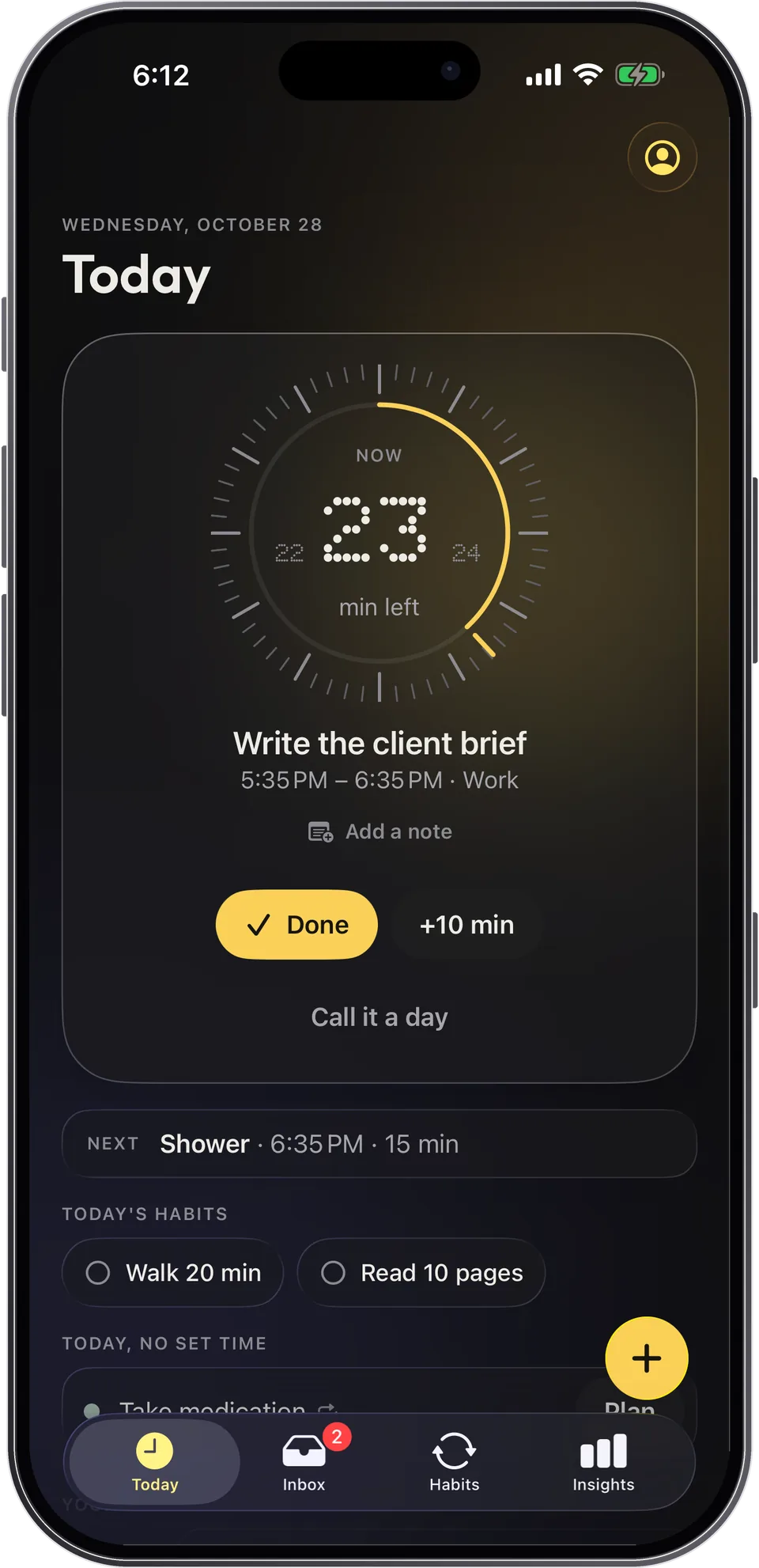
Capday is a visual day planner for iOS, built with ADHD and autistic people in mind, and useful to anyone who wants to see their day. It’s a planning tool, not a medical device. Here’s how it maps to the criteria above.
- Time you can see: the current block sits on a dial that empties as time passes, with the minutes left and “Next” always visible.
- Forgiving by design: “+10 min” in one tap, “Call it a day” moves what’s left to tomorrow or the Inbox, unfinished things are offered the next morning without “overdue” language, and habits show 30 days of dots where rest days count and no streak resets to zero.
- Where you look: Apple Watch with gentle taps before a block ends and when the next one starts, a Live Activity on the Lock Screen, widgets and Siri.
- Private, with clear pricing: no account, no ads, no analytics; your data stays on your device, with optional private iCloud sync. The free version is complete; Capday Pro is €4.99/month, €29.99/year with a 7-day free trial, or €79.99 one time.
- Its limits: iPhone, iPad and Apple Watch only (iOS 26 or later), in English and French. No Android version and no web app.
Frequently asked questions
What is the best planner app for ADHD?
There isn’t one best app for everyone. The best ADHD planner app is the one you still open on a bad day. Use the checklist in this guide, then test it for a normal week with the free version or trial.
Is a paper planner better than an app for ADHD?
It depends on you. Paper is distraction-free, but it can’t warn you when a block is ending. An app can tap your wrist or show a countdown on your Lock Screen. Plenty of people use both.
Does an ADHD app need an account?
No. An account adds a password and one more step. Capday works without one: your data stays on your device, with optional private iCloud sync.
How much does Capday cost?
The free version is complete. Capday Pro is €4.99/month, €29.99/year with a 7-day free trial, or €79.99 lifetime. Pro adds unlimited routines (3 on free), the full routine library, the weekly review and insights over 30 and 90 days.
Does Capday work on Android?
No. Capday runs on iPhone, iPad and Apple Watch with iOS 26 or later. There’s no Android version and no web app.
Is Capday a medical device?
No. Capday is a planning tool designed with ADHD in mind. For questions about your health, talk to a professional.
Sources
- Song P, Zha M, Yang Q, Zhang Y, Li X, Rudan I (2021). The prevalence of adult attention-deficit hyperactivity disorder: A global systematic review and meta-analysis. Journal of Global Health, 11:04009. doi.org
- Marx I, Cortese S, Koelch MG, Hacker T (2022). Meta-analysis: Altered perceptual timing abilities in attention-deficit/hyperactivity disorder. Journal of the American Academy of Child & Adolescent Psychiatry, 61(7), 866–880. doi.org
- Barkley RA (2011). The importance of executive function in understanding and managing ADHD (interview). Attention magazine, CHADD, April 2011. chadd.org
- Gollwitzer PM, Sheeran P (2006). Implementation intentions and goal achievement: A meta-analysis of effects and processes. Advances in Experimental Social Psychology, 38, 69–119. doi.org
- Lally P, van Jaarsveld CHM, Potts HWW, Wardle J (2010). How are habits formed: Modelling habit formation in the real world. European Journal of Social Psychology, 40(6), 998–1009. doi.org
- Silverman J, Barasch A (2023). On or off track: How (broken) streaks affect consumer decisions. Journal of Consumer Research, 49(6), 1095–1117. doi.org
- Dai H, Milkman KL, Riis J (2014). The fresh start effect: Temporal landmarks motivate aspirational behavior. Management Science, 60(10), 2563–2582. doi.org
Capday is a planning tool, not a medical device. It does not diagnose anything and is not a substitute for professional advice.