
Visual timer for adults and kids: why and how to use one
In short
A visual timer shows the time remaining as a colored area that shrinks, usually a disc or ring that empties as the minutes pass, instead of numbers alone. You can see at a glance how much time is left without doing any math.
What is a visual timer?
A visual timer displays a length of time as a shape: a colored disc, a ring or a bar that shrinks as time passes. The best-known example is the Time Timer, but the same idea exists in apps and on watches. The point is simple: you see what's left instead of reading numbers and working it out.
With a regular clock, knowing how much time is left takes a bit of mental math: it's 2:37, I need to stop at 3:00, so… With a visual timer, the answer is a shape. The bigger the colored area, the more time you have.
Swedish researchers group these timers with other time-assistive devices, such as alarm clocks, reminders and schedules, and describe them as timers that show time as dots or a surface that decrease in number or size 6. They come in a few forms:
- The shrinking disc. A colored wedge that sweeps back like a clock hand, the most common design.
- The progress bar. A strip that gets shorter, handy on narrow screens.
- The ring. A circle that empties around the minutes left, common on phones and watches.
A visual timer doesn't replace a clock. It answers a different question. A clock tells you what time it is. A timer tells you how much time you have left for what you're doing right now.
Why is it so hard to feel time passing?
Because your sense of duration depends on where your attention goes. When a task absorbs you, time slips by unnoticed, and most people underestimate how long planned tasks will take. This is true for everyone, and research suggests these gaps are often larger for people with ADHD, though findings in adults are still limited.
A meta-analysis of 117 experiments looked at how mental workload affects duration judgments. When people know they will have to judge how much time has passed, a more demanding task makes the duration seem shorter, and estimates become more variable 1. Put simply, the more your attention goes to the task, the less is left to keep track of time.
The same bias shows up when you plan. In a classic study, students finishing their honors thesis predicted on average that they would hand it in within 33.9 days. They actually took 55.5 days, and fewer than a third (29.7%) finished by their own best estimate 2. The researchers called this the planning fallacy.
What about ADHD? A meta-analysis of 55 studies found a broad range of timing differences in people with ADHD, such as telling very brief durations apart or estimating a few seconds 3. In adults, the evidence is thin: a 2023 review found only 9 studies from the past decade, with results that varied from one study to the next 4.
You may have heard the term "time blindness." It's widely used and helpful for describing a lived experience, but it isn't an official symptom in the DSM-5-TR.
Most of this research measures short durations in a lab. It doesn't explain everything about daily life, but it helps show why an external, visible cue can take some weight off: you no longer have to feel time, you can look at it.
“time perception in adult ADHD has a very high complexity and variability”
Do visual timers work? What the research says
The evidence is encouraging but thin. Most studies involve children, include few participants and test the timer alongside other supports. They suggest a visual timer can help with waiting and with keeping track of time, but they don't prove it works on its own or for everyone. See it as a reasonable tool to try.
- One child, a clear result. An Irish team worked with a child with a developmental disability who found waiting hard. By pairing a visual timer with the instruction "wait," they stretched the wait step by step from one second to ten minutes, then kept the timer alone without the cue card 5. Encouraging, but it's a single case.
- A randomized trial, modest effects. In Sweden, 38 children with ADHD aged 9 to 15 were randomly assigned to an education session or a 12-week program combining time-skills training with time-assistive devices, including visual timers. Time-processing skills improved more in the program group, with a small-to-moderate effect, and parents reported better daily time management. The children's own ratings showed no clear difference 6. The study can't separate the timer's effect from the rest of the program.
- A warning isn't always enough. For two preschoolers, a spoken heads-up right before a transition did not reduce tantrums. A different, reinforcement-based approach is what helped 8. A cue, visual or not, doesn't solve everything.
For adults who work or study, we didn't find a solid study testing a visual timer on its own. The rest of this guide is practical advice: try it, notice what happens and keep what works for you.
| Option | Strengths | Limits | Best for |
|---|---|---|---|
| Physical visual timer (disc) | No screen, always visible, easy for kids to understand | Stays in one place, one duration at a time, the alarm can be loud | Desks, classrooms, routines at home |
| Timer app on a phone | Always with you, saved durations, often free | Your phone can distract you, one duration at a time, needs restarting for each activity | Work sessions, on the go |
| Smartwatch | Discreet taps on the wrist, no need to take out your phone | Small screen, requires a watch, battery to keep an eye on | Meetings, transitions while out, quiet places |
| Visual planner with a built-in timer (like Capday) | The timer follows the current block, what's next stays visible, warns you before the end | You need to plan your day, takes a little setup, built for personal rather than shared use | Days with several activities in a row |
How do you use a visual timer for work or study?
Pick one task, set a short block, around 20 to 30 minutes, and put the timer where you can see it. When the disc is empty, take a real break you planned in advance. It's the Pomodoro idea with one difference that matters: you see the time left the whole way through instead of waiting for an alarm.
Planned breaks seem to have value. A Dutch study of 87 university students compared fixed breaks (6 minutes every 24 minutes, or 3 minutes every 12) with breaks students chose themselves. Those who set their own breaks studied longer but also took longer breaks, and reported more fatigue, less concentration and less motivation. The amount of work they completed was about the same 7.
That was a single day of study with university students, so take it as a hint, not a universal rule. Here is a simple way to start:
- One task per timer. Write down what you'll do before you start. "Work on the report" is vague. "Draft the introduction" works better.
- Start short. Try 15 to 25 minutes at first. You can go longer once it feels easy.
- In view, not in your face. Place the timer where a glance is enough, without it pulling your eyes all the time.
- Plan the break before you begin. Otherwise, the end of the timer becomes the moment you open your phone for "just a minute."
- Allow yourself to extend. Adding a few minutes when you're on a roll isn't a failure. It's an adjustment.
How do you use a visual timer with kids or in the classroom?
Show the timer before you start it, say what comes next ("when the red is gone, we put on shoes") and keep it visible the whole time. It works best for transitions, routines and waiting. Avoid using it as a threat. It's a shared reference point for everyone, not a countdown to punishment or a race.
For a child who can't read a clock yet, "five more minutes" doesn't mean much. A shrinking shape does. A few common uses:
- Transitions. Screen time, the park, bath time: the disc shows the end is coming instead of an abrupt stop.
- Routines. One step, a little time: getting dressed, brushing teeth, packing a school bag.
- Waiting for a turn. The timer makes waiting concrete, as in the case study described above 5.
- In the classroom. A large timer everyone can see shows how long an exercise or cleanup lasts, so the teacher doesn't have to announce the time every two minutes.
Visual cues like these are common with autistic and ADHD children, but every child responds differently. Some find a countdown stressful. Start with enjoyable moments, so the timer isn't linked only to the end of things the child likes.
If a transition stays hard even with a timer, that isn't a failure on the child's part or yours. A warning alone isn't always enough 8. A professional can help you figure out what's getting in the way.
Physical timer, app or watch: which should you choose?
Choose based on where you need it. A physical timer is simple and screen-free, great on a desk or in a classroom. An app goes everywhere with you and can chain several blocks. A watch gives you a discreet tap on the wrist without taking out your phone. Many people end up combining two of them.
The table below compares the options. A few questions to help you decide:
- Do you work at the same desk? A timer placed in your line of sight is often enough.
- Do you move around between home, work and errands? An app or a watch comes with you.
- Does your phone pull you in? A physical timer or a watch saves you from unlocking it.
- Do you switch between many activities in a day? A planner that shows a timer for the current block and what comes next saves you from restarting a timer by hand each time.
- Does noise bother you or the people around you? Look for a silent mode or vibrations.
What mistakes should you avoid with a visual timer?
The most common ones are blocks that are too long, relying only on the alarm and turning the timer into pressure. A two-hour disc empties too slowly to notice it moving. An alarm alone tells you only when time is already up. Keep blocks short, and glance at the time while you work, not just at the end.
- Blocks that are too long. Most people underestimate how long things take 2. Break work into chunks of 15 to 45 minutes and add some buffer.
- Alarm only. An alarm says "time's up," never "you have ten minutes left." The whole value of a visual timer is the in-between. If you want a signal, choose a gentle heads-up a little before the end.
- The timer as a threat. Used to rush someone ("hurry, the red is almost gone"), it becomes a source of stress, especially for kids.
- No plan for what's next. When the disc is empty, you need to know what to do next. Otherwise, the transition turns into drifting.
- No buffer between blocks. Tidying up, getting a glass of water, changing rooms: it all takes time. Leave a few minutes for transitions.
- Giving up after a miss. If you run over, adjust the length next time. A timer also teaches you how long things really take you.
How Capday can help
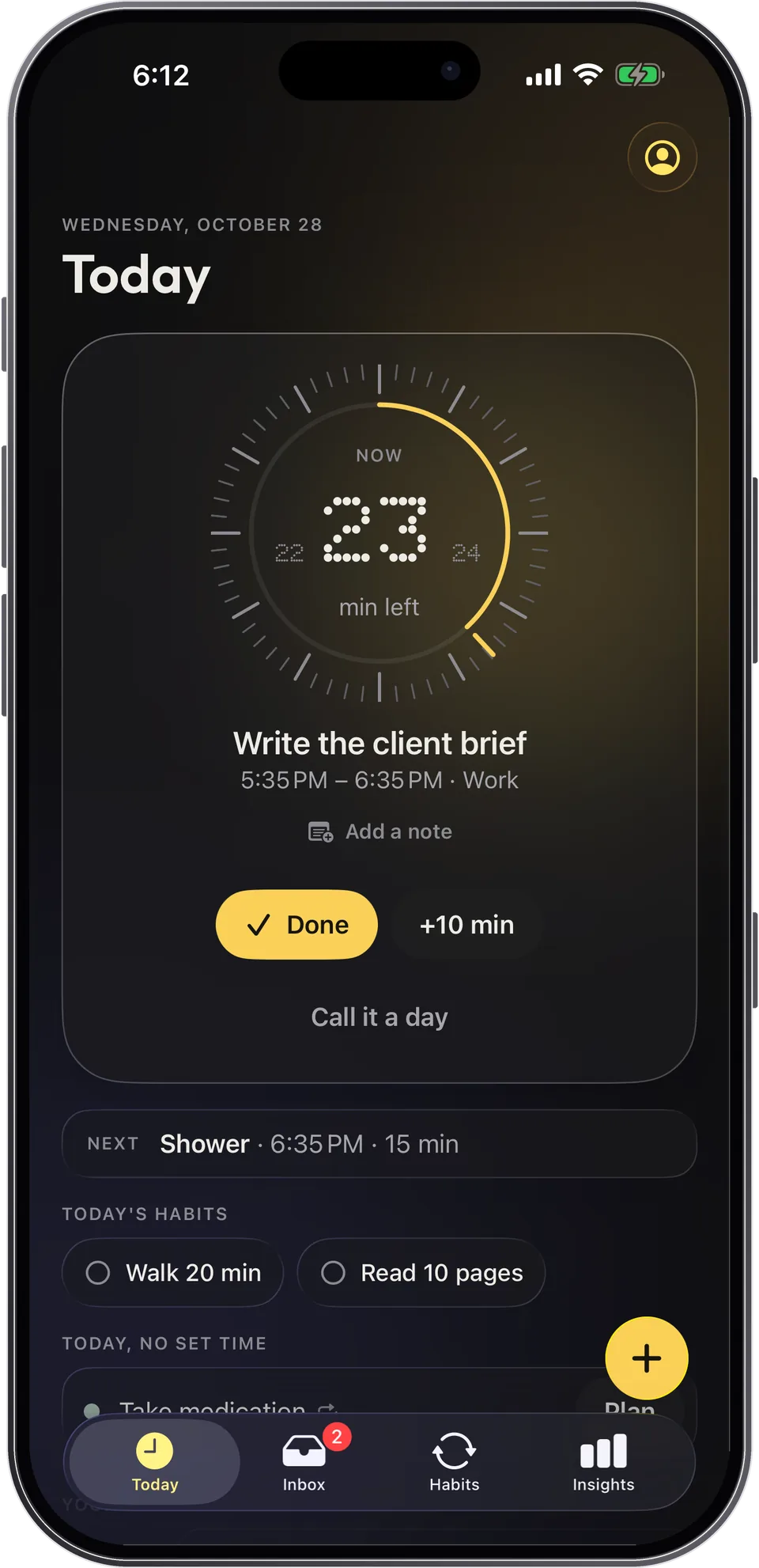
Capday is a visual day planner for iPhone, iPad and Apple Watch. Your day is a list of time blocks, and the current block sits on a dial, a ring that empties as time passes, just like a visual timer, with the minutes left and what comes next always in view. It was built with ADHD and autistic people in mind, and it's made for everyone. It is a planning tool, not a medical device.
- A timer that follows your day. The dial always shows the current block, and "Next" stays visible, so you never have to restart a timer for each activity.
- +10 min in one tap. On a roll? Add ten minutes with one tap, or drag a block's edge to change its length. Every change can be undone.
- On your wrist. Apple Watch shows the current block and time left, with gentle taps before a block ends and when the next one starts.
- Without opening the app. A Live Activity on the Lock Screen and widgets show where you are.
- Routines with a timer for each step. Morning or evening, one step at a time, each with its own timer. The free version is complete, with no account and no ads.
Frequently asked questions
How long should I set a visual timer for?
It depends on the task and on you. For focused work, 20 to 30 minutes is a good starting point. For a young child, a few minutes is often enough. If you keep running over, shorten it. If you always stop mid-flow, make it longer.
Are visual timers only for ADHD or autism?
No. They're common in those settings, but everyone loses track of time when a task absorbs them 1. Visual timers are also useful for students, parents, teachers and anyone who would rather see time than guess it.
Does a visual timer work for adults?
Most research involves children, and we didn't find a solid study testing a visual timer on its own with adults. The principle, making time visible, applies at any age. Try it for a few days and keep what helps.
Can a visual timer feel stressful?
Yes, for some people. If a shrinking disc makes you anxious, move it to the edge of your view, turn off the sound or use it only for transitions. With a child, introduce it during enjoyable moments first.
Do I need an alarm at the end?
Not necessarily. A vibration or a gentle signal shortly before the end helps you wrap up without a jolt. What matters most is seeing time during the activity, not just being alerted once it's over.
Is Capday a medical app?
No. Capday is a planning tool, not a medical device. It is designed to help you see your day and the time passing, and it doesn't replace support from a professional.
Sources
- Block, R. A., Hancock, P. A., & Zakay, D. (2010). How cognitive load affects duration judgments: A meta-analytic review. Acta Psychologica, 134(3), 330–343. doi.org
- Buehler, R., Griffin, D., & Ross, M. (1994). Exploring the "planning fallacy": Why people underestimate their task completion times. Journal of Personality and Social Psychology, 67(3), 366–381. doi.org
- Marx, I., Cortese, S., Koelch, M. G., & Hacker, T. (2022). Meta-analysis: Altered perceptual timing abilities in attention-deficit/hyperactivity disorder. Journal of the American Academy of Child & Adolescent Psychiatry, 61(7), 866–880. pubmed.ncbi.nlm.nih.gov
- Mette, C. (2023). Time perception in adult ADHD: Findings from a decade—A review. International Journal of Environmental Research and Public Health, 20(4), 3098. pmc.ncbi.nlm.nih.gov
- Grey, I., Healy, O., Leader, G., & Hayes, D. (2009). Using a Time Timer™ to increase appropriate waiting behavior in a child with developmental disabilities. Research in Developmental Disabilities, 30(2), 359–366. pubmed.ncbi.nlm.nih.gov
- Wennberg, B., Janeslätt, G., Kjellberg, A., & Gustafsson, P. A. (2018). Effectiveness of time-related interventions in children with ADHD aged 9–15 years: A randomized controlled study. European Child & Adolescent Psychiatry, 27(3), 329–342. pmc.ncbi.nlm.nih.gov
- Biwer, F., Wiradhany, W., oude Egbrink, M. G. A., & de Bruin, A. B. H. (2023). Understanding effort regulation: Comparing 'Pomodoro' breaks and self-regulated breaks. British Journal of Educational Psychology, 93(Suppl 2), 353–367. pubmed.ncbi.nlm.nih.gov
- Wilder, D. A., Chen, L., Atwell, J., Pritchard, J., & Weinstein, P. (2006). Brief functional analysis and treatment of tantrums associated with transitions in preschool children. Journal of Applied Behavior Analysis, 39(1), 103–107. pmc.ncbi.nlm.nih.gov
Capday is a planning tool, not a medical device. It does not diagnose anything and is not a substitute for professional advice.