
Time blocking: how to time block your day, flexibly
In short
Time blocking means giving each task or type of work its own slot on your calendar, instead of picking from a to-do list as the day goes. Each block says what you'll do, when, and for how long.
What is time blocking?
Time blocking is a planning method where you divide your day into blocks of time and give each one a task or a theme: deep work, email, errands, a break. Instead of an open-ended list, you get a sequence. The goal isn't to control every minute but to decide in advance where your attention goes.
A to-do list answers "what?". A time-blocked day also answers "when?" and "for how long?". That second part is where plans quietly break: a list of ten tasks can look reasonable until you notice it would take fourteen hours to finish.
A block can hold:
- One task. "Draft the report, 9:00 to 10:30."
- A batch of small tasks. Email, messages and admin, handled together.
- A theme. "Afternoon: client work" or "Tuesday morning: studying," without deciding every detail in advance.
- Rest. Lunch, a walk, a buffer. These are real blocks too.
Time blocking is useful for anyone with more to do than hours to do it in: employees between meetings, students during exam season, freelancers juggling several clients.
Why does time blocking help you get more done?
Time blocking cuts down on task switching, and every switch has a cost. Research shows people lose time when they move from one task to another, and part of their attention stays stuck on the previous one. Grouping similar work into protected blocks means fewer switches and more focused time, without working longer hours.
- Switching takes time. In four experiments, Rubinstein, Meyer and Evans had young adults alternate between tasks such as solving math problems and classifying geometric shapes. Participants lost time with every switch, and the cost grew as tasks became more complex or less familiar 45. A single switch may cost only a few tenths of a second, but it adds up. David Meyer, one of the authors, has estimated that these brief mental blocks can cost as much as 40% of someone's productive time 5.
- Attention lingers. Researcher Sophie Leroy calls this attention residue: when you move on, part of your mind is still on the previous task 2. In later studies, people who expected to return to unfinished work under time pressure struggled to focus on the next task and performed worse on it 3.
- Planning goes hand in hand with wellbeing. A 2021 meta-analysis pooled 158 studies and nearly 54,000 participants. Time management was moderately linked to job performance (r = 0.26) and slightly more strongly to wellbeing (r = 0.31) 6.
These are correlations about time management in general, so they don't prove that time blocking itself causes these effects. They do suggest that planning is as much about feeling better as about doing more.
“people can know the past and yet still be doomed to repeat it”
Why do we always underestimate how long things take?
Psychologists call it the planning fallacy: we picture how a task should go and forget how similar tasks actually went. It affects almost everyone, not just people who see themselves as disorganized. For time blocking, the fix is simple: size your blocks based on past experience, then add buffers, because your first estimate is probably too short.
In a classic study, Buehler, Griffin and Ross asked 37 psychology students finishing their honors thesis when they expected to submit it. On average, they predicted 33.9 days. They actually took 55.5. Fewer than a third (29.7%) finished within their own best estimate, and fewer than half (48.7%) had finished even by their worst-case date 1.
The same paper points to a way out. When participants were asked to connect relevant past experiences to their new prediction, the optimistic bias disappeared 1.
In practice:
- Before sizing a block, ask "how long did this take last time?" rather than "how long should it take?"
- Note how long a few tasks really take for one week. You'll quickly see your own gap.
- Leave buffers between blocks: 10 to 15 minutes absorbs small overruns before they snowball.
| Method | Answers | Strengths | Limits | Best for |
|---|---|---|---|---|
| To-do list | What to do? | Fast capture, flexible, almost no setup | No sense of when or how long, hides the fact that the day doesn't fit, long lists can overwhelm | Collecting tasks, simple days with few constraints |
| Time blocking | When, and for how long? | Fewer task switches, shows whether the day fits, protects priorities | Takes planning time, estimates often too short, can feel rigid if every minute is fixed | Days with focused work and several competing demands |
| Pomodoro | How to pace a work session? | Easy to start, built-in breaks, steady rhythm | Fixed intervals can interrupt deep focus, doesn't say which task to do or when | Starting hard tasks, studying, structuring the inside of a block |
| All three combined | What, when and at what pace | List to capture, blocks for priorities, Pomodoros when starting is hard | A bit more setup at first, can over-engineer a simple day | Busy weeks, studying, freelancers with several projects |
How do you time block your day?
Start with what's fixed (meetings, classes, appointments), then put your most important task in your best hours. Use blocks of 30 to 90 minutes, batch small tasks together, add buffers and breaks, and leave part of the day open. Plan the next day the evening before or first thing in the morning.
- 1. Capture first. Get every task out of your head into one list or inbox. You can't block time for something you haven't written down.
- 2. Place the fixed points. Meetings, classes, school pickup, appointments. They form the skeleton of the day.
- 3. Protect one important block. Put your most demanding work where your energy is usually highest. One protected block beats a perfectly packed day.
- 4. Pick a block size. 30 to 90 minutes suits most focused work. Short blocks are easier to start; longer ones fit work that needs deep focus. Batch anything under 15 minutes into a single "admin" block.
- 5. Add buffers and breaks. Between blocks, and as real blocks: meals, a walk, transition time.
- 6. Try theme blocks. If exact slots feel too rigid, block by theme: "morning: writing," "afternoon: calls and email." You keep the focus benefit with more freedom inside each block.
- 7. Leave white space. Don't fill every hour. Keep at least one open block for the unexpected.
If you have ADHD, or simply find it hard to feel time passing, shorter blocks and a visible countdown can make the plan easier to follow. Many people call this time blindness, a widely used term rather than an official DSM-5-TR symptom.
What should you do when a time block runs over?
Adjust the plan instead of abandoning it. Decide whether to extend the block, shorten the next one, or move a task to later or tomorrow. Before switching, jot down where you stopped and what comes next. A plan that bends is still a plan; one you drop at 10 a.m. isn't.
Overruns are normal, not a failure. The planning fallacy research suggests your estimates will often be too short 1. So build the response into your method:
- Extend, if it's worth it. Take 10 or 15 minutes from a buffer, then move on.
- Shift, don't cram. Slide the next blocks later, or shrink a less important one.
- Move what no longer fits. Send it to tomorrow or back to your list. Rescheduling is part of time blocking, not a breach of it.
- Leave a ready-to-resume note. Leroy and Glomb found that briefly reflecting on and planning your return to an interrupted task reduced attention residue, so performance on the next task no longer suffered 3. One line is enough: "next: rewrite the intro to part 3."
At the end of the day, look at what moved and why. That's information for tomorrow's estimates, not a grade.
Time blocking vs. to-do list vs. Pomodoro: which should you use?
They answer different questions. A to-do list says what to do, time blocking says when and for how long, and the Pomodoro Technique paces short cycles of work and rest. They combine well: keep a list to capture everything, block time for your priorities, and use Pomodoro-style intervals inside a block when getting started is hard.
The Pomodoro Technique alternates short stretches of focused work with short breaks. In a study of 87 students at a Dutch university during one day of self-study, those who took fixed breaks (6 minutes after every 24 minutes, the "Pomodoro" condition, or 3 minutes after every 12) reported less fatigue and distraction, and more concentration and motivation, than students who chose their own break times. Invested mental effort and task completion were the same across groups 7.
That study looked at breaks during a single day of studying, not at time blocking as a whole. Still, it points the same way: deciding the structure in advance can make work feel better without getting less done.
The table below sums up the strengths and limits of each method.
What are the most common time blocking mistakes?
The classic mistakes are packing every minute, sizing blocks on hope rather than history, forgetting breaks and transitions, and giving up after the first overrun. Time blocking works best as a flexible draft of your day. If the plan keeps breaking, it's usually the plan that needs fixing, not you.
- A day with no gaps. Back-to-back blocks leave no room for overruns, transitions or surprises.
- Optimistic estimates. Remember the planning fallacy: base blocks on real past durations 1.
- Too many tiny blocks. If you spend more time rearranging the schedule than working, switch to bigger blocks or themes.
- Ignoring your energy. A demanding task placed at your lowest point of the day stays hard, whatever the plan says.
- Treating the plan as a contract. When the day slips, re-plan the rest of it. Dropping everything at the first overrun turns a small delay into a lost day.
- Never reviewing. A quick weekly look at what took longer than planned makes your next estimates better.
How Capday can help
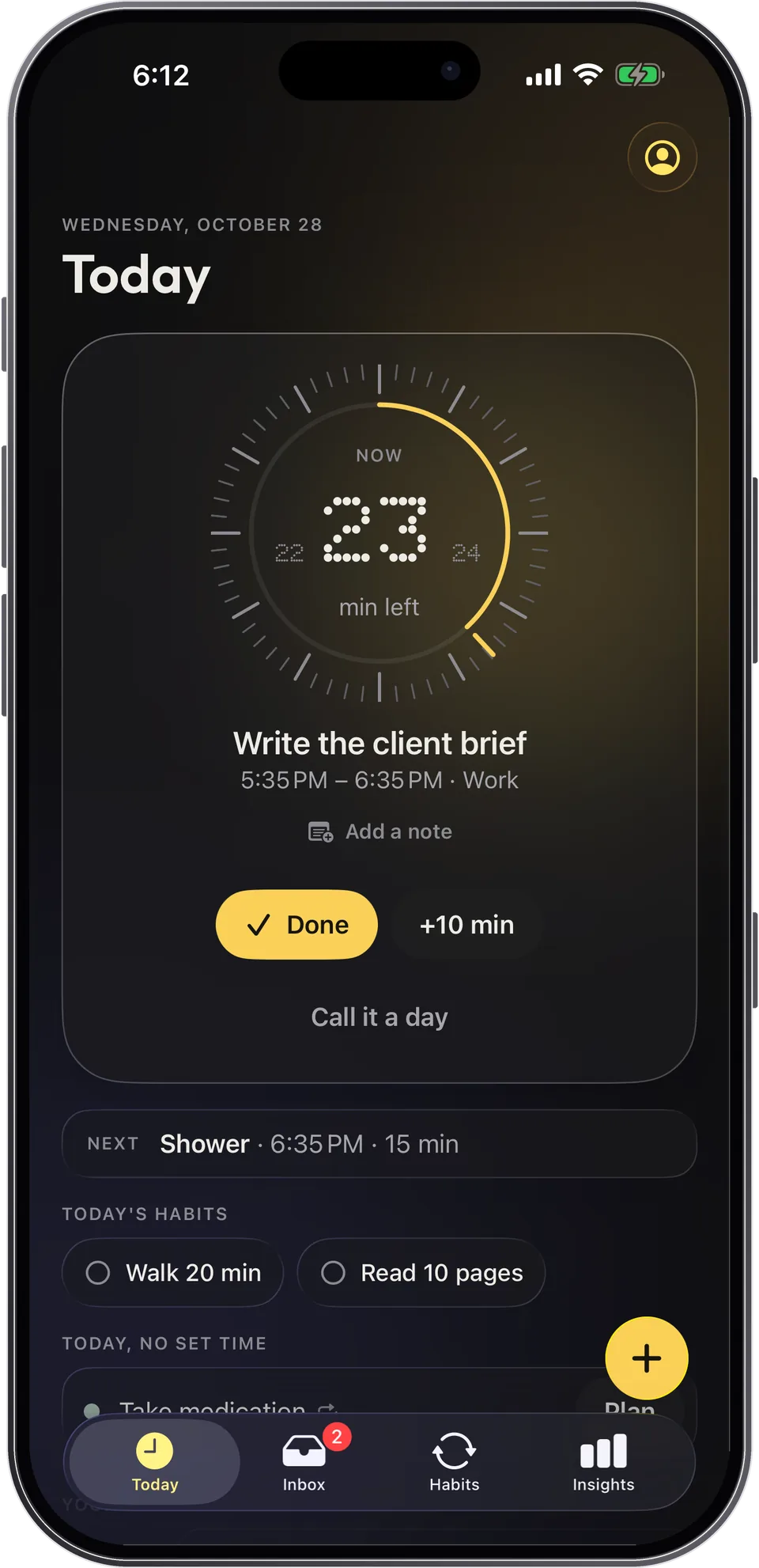
Capday is a calm visual day planner for iPhone, iPad and Apple Watch, built around time blocks. Your day is a list of blocks, and the current one sits on a dial that empties as time passes, with the minutes left and "Next" always visible. It was designed with ADHD and autistic people in mind, and it's for anyone who wants to see their day clearly.
- See the block you're in. The dial shows the minutes left, and your Apple Calendar events are shown too (read-only).
- Adjust instead of abandoning. "+10 min" takes one tap, you can drag a block's edge to change its length, and every change can be undone.
- Move what's left, without guilt. "Call it a day" moves the rest to tomorrow or the Inbox, and the morning carry-over offers unfinished things without "overdue" language.
- Capture now, block later. The Inbox takes a task in two seconds, and notes on any task work as ready-to-resume notes.
- Gentle transitions. On Apple Watch, soft taps arrive before a block ends and when the next one starts. The free version is complete, there's no account, and your data stays on your device.
Frequently asked questions
Is time blocking just putting tasks in your calendar?
Almost, with one difference: you block time for your own work, not just for meetings. A calendar full of meetings tells others when you're busy. Time blocking also reserves time for the tasks that would otherwise keep getting squeezed out.
How long should a time block be?
For focused work, 30 to 90 minutes is a good starting range. Use shorter blocks for tasks that are hard to start, and batch anything under 15 minutes into one block. Then adjust based on how long things really take you.
Does time blocking work with ADHD?
It can help, with a few adjustments: shorter blocks, bigger buffers, a visible timer and a heads-up before each transition. It isn't a treatment, and what works varies a lot from person to person, so treat it as an experiment and keep what helps.
Should I plan every minute of my day?
No. Plan your important blocks and fixed commitments, add buffers and keep some open time. A fully packed schedule breaks at the first overrun, and constant rescheduling becomes a chore of its own.
When should I plan my time blocks?
The evening before or first thing in the morning, in 5 to 10 minutes. Many people also do a quick weekly plan to spread big tasks across the week, then fine-tune each day.
Sources
- Buehler, R., Griffin, D., & Ross, M. (1994). Exploring the "planning fallacy": Why people underestimate their task completion times. Journal of Personality and Social Psychology, 67(3), 366–381. doi.org
- Leroy, S. (2009). Why is it so hard to do my work? The challenge of attention residue when switching between work tasks. Organizational Behavior and Human Decision Processes, 109(2), 168–181. doi.org
- Leroy, S., & Glomb, T. M. (2018). Tasks interrupted: How anticipating time pressure on resumption of an interrupted task causes attention residue and low performance on interrupting tasks and how a "ready-to-resume" plan mitigates the effects. Organization Science, 29(3), 380–397. doi.org
- Rubinstein, J. S., Meyer, D. E., & Evans, J. E. (2001). Executive control of cognitive processes in task switching. Journal of Experimental Psychology: Human Perception and Performance, 27(4), 763–797. doi.org
- American Psychological Association (2006). Multitasking: Switching costs. www.apa.org
- Aeon, B., Faber, A., & Panaccio, A. (2021). Does time management work? A meta-analysis. PLOS ONE, 16(1), e0245066. doi.org
- Biwer, F., Wiradhany, W., oude Egbrink, M. G. A., & de Bruin, A. B. H. (2023). Understanding effort regulation: Comparing 'Pomodoro' breaks and self-regulated breaks. British Journal of Educational Psychology, 93(S2), 353–367. doi.org
Capday is a planning tool, not a medical device. It does not diagnose anything and is not a substitute for professional advice.